
Table Of Contents
-
Start With A Clear Video Idea
Table Of Content
- Table Of Contents
- Start With A Clear Video Idea
- Turn The Idea Into A Simple Story
- Build A Short Storyboard
- Write Better Video Prompts
- Keep Visuals Consistent
- Create Clips In Small Batches
- Edit For Pace And Clarity
- Review Sound, Text And Details
- Check Rights And Disclosure
- Common Questions About AI Video
- How Long Should A Short AI Video Be?
- Should The Video Start With Text Or Action?
- How Many Shots Should A Beginner Plan?
- Why Do AI Video Clips Look Inconsistent?
- Final Checklist
-
Turn The Idea Into A Simple Story
-
Build A Short Storyboard
-
Write Better Video Prompts
-
Keep Visuals Consistent
-
Create Clips In Small Batches
-
Edit For Pace And Clarity
-
Review Sound, Text, And Details
-
Check Rights And Disclosure
-
Common Questions About AI Video
-
Final Checklist
Short AI videos work best when they begin with a specific creative decision rather than a vague request for something “cinematic.” Whether you are testing a social concept, visualizing a product, or asking can Claude make videos, a repeatable planning process helps turn generated clips into a coherent final piece.
The goal is not to automate every choice. It is to use AI for rapid visual exploration while keeping human control over the story, pacing, brand details, accuracy, and final review.
Start With A Clear Video Idea
A strong concept is more valuable than an oversized prompt because it gives every later decision a purpose. Before generating anything, define the subject, audience, desired response, mood, format, and approximate length. A 15-second product demonstration, for example, may need only one product, one useful action, and one clear benefit.
Create a brief with five parts: the main subject, the setting, the action, the visual style, and what the viewer should feel or do next. “A runner ties bright shoes at sunrise, then starts down a quiet trail” is easier to plan than “make an inspiring fitness video.”
Turn The Idea Into A Simple Story
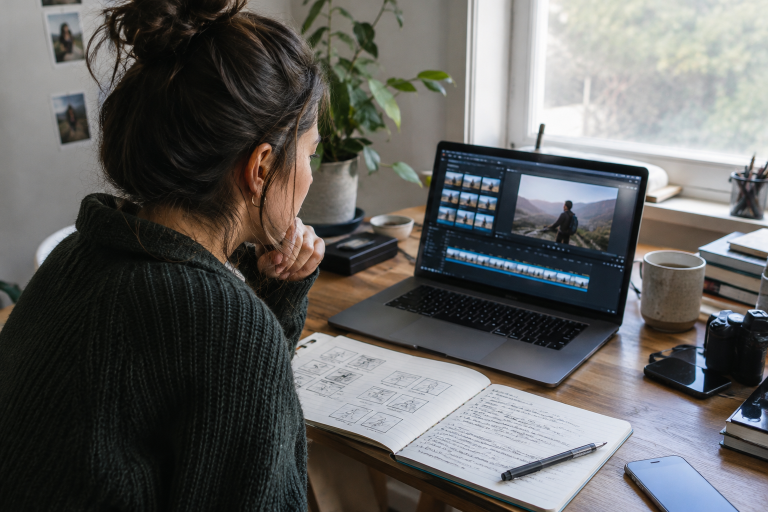
Short videos rarely need several plot turns. Focus on one moment of change: a room becomes welcoming, a meal comes together, or a product solves a small problem. Use a simple beginning, middle, and end: establish the scene, show movement or change, then reveal the result.
Use narration when an explanation is necessary, captions when viewers may watch without sound, and visuals alone when the action communicates the point immediately. Avoid making all three compete for attention.
Build A Short Storyboard
A storyboard reduces unnecessary generations and makes editing more predictable. For a simple short, plan three to six shots. Each frame should identify the shot size, camera position, subject placement, action, lighting, and any sound cue.
This compact storyboard format keeps production decisions visible before you create clips.
|
Shot |
Duration |
Action |
Camera |
Notes |
|---|---|---|---|---|
|
1 |
3 seconds |
Product on desk |
Slow push in |
Soft morning light |
|
2 |
4 seconds |
Hand uses product |
Close-up |
Show key detail |
|
3 |
3 seconds |
Finished result |
Still wide shot |
Caption or logo |
Write Better Video Prompts
Write prompts as clear production instructions. Separate the subject, action, setting, camera movement, lighting, style, duration, and sound. Describe motion plainly: “the camera tracks beside the cyclist” is more useful than a long collection of abstract style terms.
A vague request such as “a beautiful coffee ad” leaves major decisions unresolved. A focused request might be: “Close-up of a ceramic cup filling with coffee on a wooden counter, gentle steam rising, slow side-to-side camera move, warm window light, natural commercial style, five seconds, quiet kitchen ambiance.” Keep one primary action per clip.
Keep Visuals Consistent
Characters, props, colors, and locations can shift between separately generated shots. Make a reference sheet first and record appearance, clothing, key props, time of day, color palette, lens feel, and framing. An approved image reference can help anchor those choices, but it does not remove the need for careful review.
When a result changes an important detail, revise only the affected shot instead of rebuilding the whole sequence. Selective reruns save time and protect the continuity you already approved.
Create Clips In Small Batches
Test one shot before producing an entire sequence. Short tests quickly expose framing problems, awkward motion, altered faces or hands, and objects behaving unexpectedly. Review every result with three questions: Is the subject recognizable? Did the action happen as intended? Does this shot support the story?
Several small revisions usually yield better control than a single massive prompt that contains every creative idea at once.
Edit For Pace And Clarity
Editing turns individual clips into a message. Remove slow openings, repeated motion, and shots that do not add information. A clean cut is often more effective than a decorative transition. Keep on-screen text visible long enough to read, and end once the core idea lands.
Social clips generally need a fast opening; tutorials need room for each instruction; product videos need readable detail; and short stories need enough time for emotion or change. Let the purpose determine the pace.
Review Sound, Text And Details
Sound shapes clarity as much as visuals. Balance voiceover, music, ambiance, and intentional silence so that no element overwhelms the message. Check captions for spelling, timing, contrast, and placement away from important visual details.
Before export, inspect faces, hands, signs, labels, reflections, background movement, and sudden changes in shape or color. Watch once with sound, once with the sound muted, and once on a smaller screen.
Check Rights And Disclosure
Review the rights and permissions connected to images, music, voices, likenesses, logos, and reference materials. Human creative decisions can also matter when considering ownership questions, so creators should consult the Copyright Office’s AI guidance when evaluating U.S. copyright issues.
Consider clear disclosure when a video includes synthetic people, voices, or realistic events that viewers could mistake for real footage. Background on synthetic media illustrates why disclosure requirements may matter in certain commercial contexts. Laws and platform policies vary by location and use case.
Common Questions About AI Video
How Long Should A Short AI Video Be?
Use the shortest length that communicates the idea. A focused clip is usually stronger than a longer sequence with extra scenes.
Should The Video Start With Text Or Action?
Start with action when the image is immediately interesting. Use text or spoken words when viewers need context before the visual makes sense.
How Many Shots Should A Beginner Plan?
Begin with three to five shots. Add complexity only after you can consistently create and assemble clips with confidence.
Why Do AI Video Clips Look Inconsistent?
Inconsistency often stems from changing references, unclear actions, overloaded prompts, or separately generated shots lacking a shared visual plan.
Final Checklist
-
The video has one clear purpose and a strong opening.
-
Every shot supports the central idea.
-
The subject, props, and visual style remain consistent.
-
Captions are accurate, readable, and well placed.
-
Sound levels are balanced and intentional.
-
Rights, permissions, and necessary disclosures have been reviewed.
-
The export fits the intended platform and audience.
Strong short AI videos come from focused planning, controlled prompting, selective generation, and thoughtful editing. The technology can speed up production, but human judgment remains essential at every meaningful stage.